No games installed in Windows 7 Professional?
For those people installing Windows 7 Professional you might notice that the Games Explorer and Start Menu look a bit sparse game wise. By default the games aren't installed in the Professional version.
You can of course quickly add them back.
Press Start
-> Control Panel
--> Programs
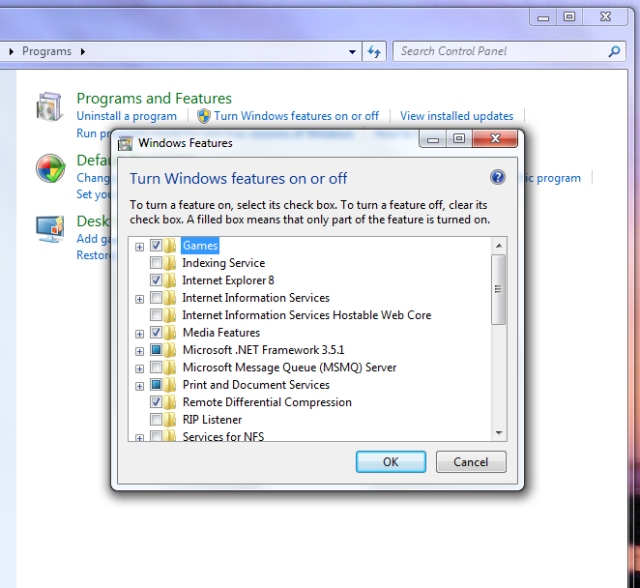
---> Turn Windows features on or off
Up the top of the list of components you should see Games. Check that box, or drill into it and specify individual games. And press OK. Within a few moments the games should be installed.
You can also add the Games Explorer on the Start Menu by right-clicking on the Start Menu -> Clicking customize and adding it in the new dialog box and OKing out.
For those still not sure, here's the video tutorial:
51 comments
is there something i have to do to turn this on.
An error has occurred. Not all the features were successfully changed.
Have tried many times but always the same result and of course no games.
Can anyone offer further advice?
Click Start > Right Click > Properties > Start Menu tab > Customize > Select Games > Display as a link or Display as a menu > OK > Apply > OK
You can also type "Shell:Games" in Windows start menu search bar and hit enter to open the Games folder.
But if the Games Explorer folder does not open in your Windows, then do this:
Type cmd in Windows 7 start menu search. When cmd appears as a result, right click on it and select Run as administrator.
In the elevated command prompt, type
regsvr32.exe gameux.dll
and hit Enter. This will re-register the gameux dll file.
Now if on running a game from the Games Explorer, you get an error message :
This file does not have a program associated with it for performing this action. Create an association in the set associations ControlPanel then, open regedit and navigate to following key:
HKEY_CLASSES_ROOT\lnkfile
If it doesnt exist, then in the RHS, create a new String value (REG_SZ) Call it IsShortcut . Click OK > Close Regedit > Reboot.
Thank you so much for your stepwise solution!
Keep up the Great Work!
could you plz advise me what to do now
Whats up and how do I rectify this?
Help and thx
Edward
Yours was the ONLY solution that worked!
23rd October 2009 11:15:13, 125 words, 48161 views 


